


Cloud-Native vs. Cloud-Lifted: The Difference That Costs You a Year
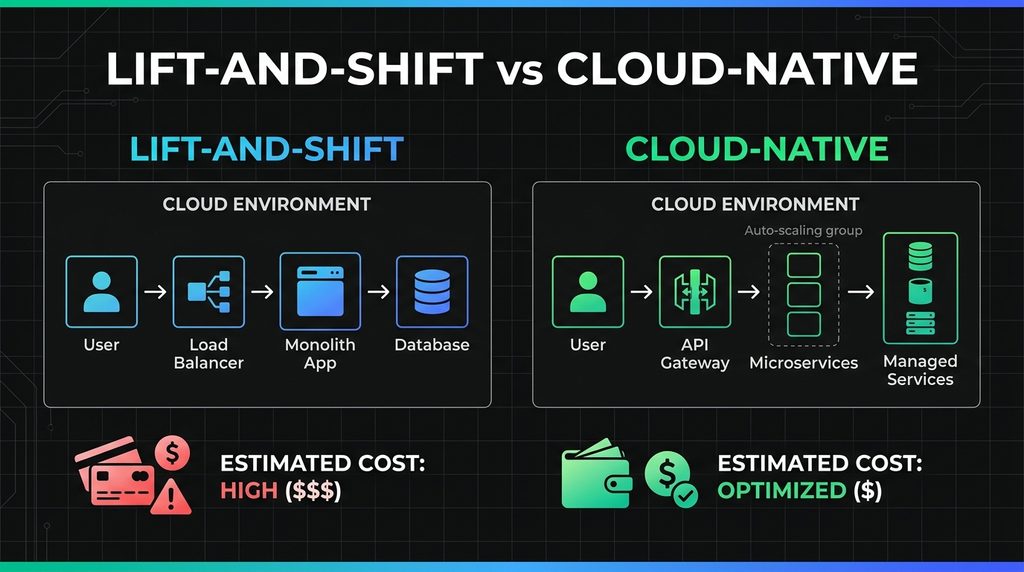
The situation that’s familiar to many of us: the cloud migration was completed on schedule, the application is now running on AWS, and the monthly bill is three times higher than the on-premises cost. Performance is the same, and the team is not able to auto-scale for peak traffic because the architecture wasn’t built for it.
This is a lift-and-shift migration. The application moved to the cloud, but the cloud did not move into the application.
Lift-and-shift moves your application to cloud infrastructure without changing its architecture. Cloud-native means the application is designed to use cloud properties, elasticity, managed services, and and horizontal scaling. Lift-and-shift is faster and cheaper to start. Cloud-native is cheaper and more capable over a two-year horizon. The question is which horizon your business is planning for.
What lift-and-shift actually means
Lift-and-shift migration is the process of moving an existing application to cloud infrastructure with minimal code or architecture changes. The application runs on virtual machines in a cloud data center instead of physical servers on-premises, with the same codebase and the same architectural constraints.
A lift-and-shift application cannot auto-scale by design. It cannot use managed cloud services for data processing, caching, or messaging without significant rework. It costs more to run because cloud pricing models are optimized for elastic, event-driven architectures, not static monoliths that consume the same compute whether traffic is high or low.
What cloud-native actually means
A cloud-native application is software designed from the ground up to use cloud infrastructure properties (elasticity, containerization, managed services, and horizontal scaling) rather than adapted from an architecture built for on-premises deployment.
Cloud-native applications use managed database services instead of self-managed database servers, which eliminates patching and backups as manual operational concerns. They use cloud-native messaging and queuing services rather than in-process message handling. They store state in services designed for persistence, not in application memory.
Lift-and-shift vs. cloud-native: at a glance
| Feature / Criteria | Lift-and-Shift | Cloud-Native |
|---|---|---|
| Migration time | Weeks to months | Months to a year+ |
| Upfront cost | Lower | Higher |
| 24-month operational cost | Higher | Lower |
| Auto-scaling | No (requires rearchitecting) | Yes (by design) |
| Managed services (databases, queues, caching) | Requires rework | Natively integrated |
| Operational overhead | High — patching, backups, capacity planning remain manual | Low — cloud managed services absorb most ops work |
| Disaster recovery | Manual or custom-built | Cloud-native DR services |
| Best for | Data centre exit on a deadline; application being retired within 12 months | Any application the business depends on for 3+ years |
| Cloud cost optimisation (reserved instances, spot, auto-scaling) | Not available without rearchitecting | Available from day one |
The cost difference over a two-year horizon
The initial cost of a lift-and-shift migration is lower. Moving infrastructure takes less time than rearchitecting a system. But the operational cost over 12 to 24 months typically exceeds the savings from the cheaper upfront approach, for three reasons:
- A static compute footprint in the cloud costs more than equivalent on-premises hardware over time, because cloud pricing assumes elastic usage.
- Lift-and-shift applications cannot take advantage of cloud cost optimization tools (reserved instances, spot instances, and auto-scaling groups) without architectural changes.
- Teams operating lifted applications still carry the full operational burden of patching, backups, and capacity planning that managed cloud services eliminate.
When lift-and-shift is the right choice anyway
Lift-and-shift is not always wrong. It is the right starting point when the goal is to exit a data center on a specific timeline, when an application is scheduled for modernization within 12 months anyway, or when the application is being retired and only needs to run during a transition period. The mistake is treating it as an equivalent alternative to cloud-native architecture for applications the business intends to rely on for the next five years.
💡 Pro tip: If your cloud migration brief describes the goal as “moving to the cloud,” pause and ask what the application architecture will look like after the move. If the answer is the same as before, the project budget should include the second migration that will be needed within two years.
Plan the architecture before the migration. Introduct’s cloud development practice evaluates architecture suitability as the first step of any cloud migration engagement. If your team is planning a move to cloud infrastructure, let’s talk about what the target architecture should look like before the first server is provisioned.
More Articles

Introduct Academy: What Makes a Software Developer Worth the Investment Introduct Academy: What Makes a Software Developer Worth the Investment
Someone joins a developer training program. Eight weeks later, they receive a certificate that says Full-Stack Developer. Two months into their first job, their team lead spends 40% of their time unblocking a person who can write the code but can’t work in a team, read error logs under pressure, or handle a production incident. […]

DevSecOps in 2026: Why Security Can’t Live Outside the Pipeline DevSecOps in 2026: Why Security Can’t Live Outside the Pipeline
Imagine a situation: you plan your penetration test two weeks before go-live. The testers find a critical authentication flaw, and fixing it takes three weeks. Your launch slips a month, your customer got the info, and the post-mortem meeting uses the word “avoidable” eleven times. That scenario played out at a number of well-funded companies […]